Meet Sparky
Sparky is the AI assistant built into your FlashBooked board. Finish a job, tap the mic and say "two hours labour, a pump for 180, invoice him". Sparky finds the customer, prices it up and shows you the invoice. You tap once to send it.
On every FlashBooked board, on your phone, tablet or computer.
Type it or say it. Sparky knows your customers, jobs, prices and team, and the page you're on, so "this customer" works.
Finished at John Murphy's. Two hours labour, a new pump for 180 and 45 for fittings. Invoice him and send it.
The invoice is priced line by line, VAT and all. Sending is its own tap.
Quote Mary Kelly for a new consumer unit and six double sockets.
Priced from your saved price list, with labour from your saved times. Anything not on the list, it asks.
Any emails since yesterday? Reply to the electrician and say Monday afternoon works.
A summary of who's waiting on you, and a reply drafted in your own words.
Book Michael's boiler service for Thursday morning with Paddy.
Checks the day, books it in and offers to let the customer know.
Mark the Smith job complete and add a note that they need a new thermostat.
Two cards, one for each change. Tap or say yes.
Who still owes us money?
Every overdue invoice, how late it is, and a reminder ready to send.
Tap the mic, or turn on hands-free and keep the phone in your pocket.
It finds the right customer, job, price and person on your board. If two customers match, it asks which.
A card shows the full invoice, booking or message before anything changes.
Only then does it happen, through the same buttons you'd press yourself.
Small changes can be undone for 15 minutes, straight from the card.
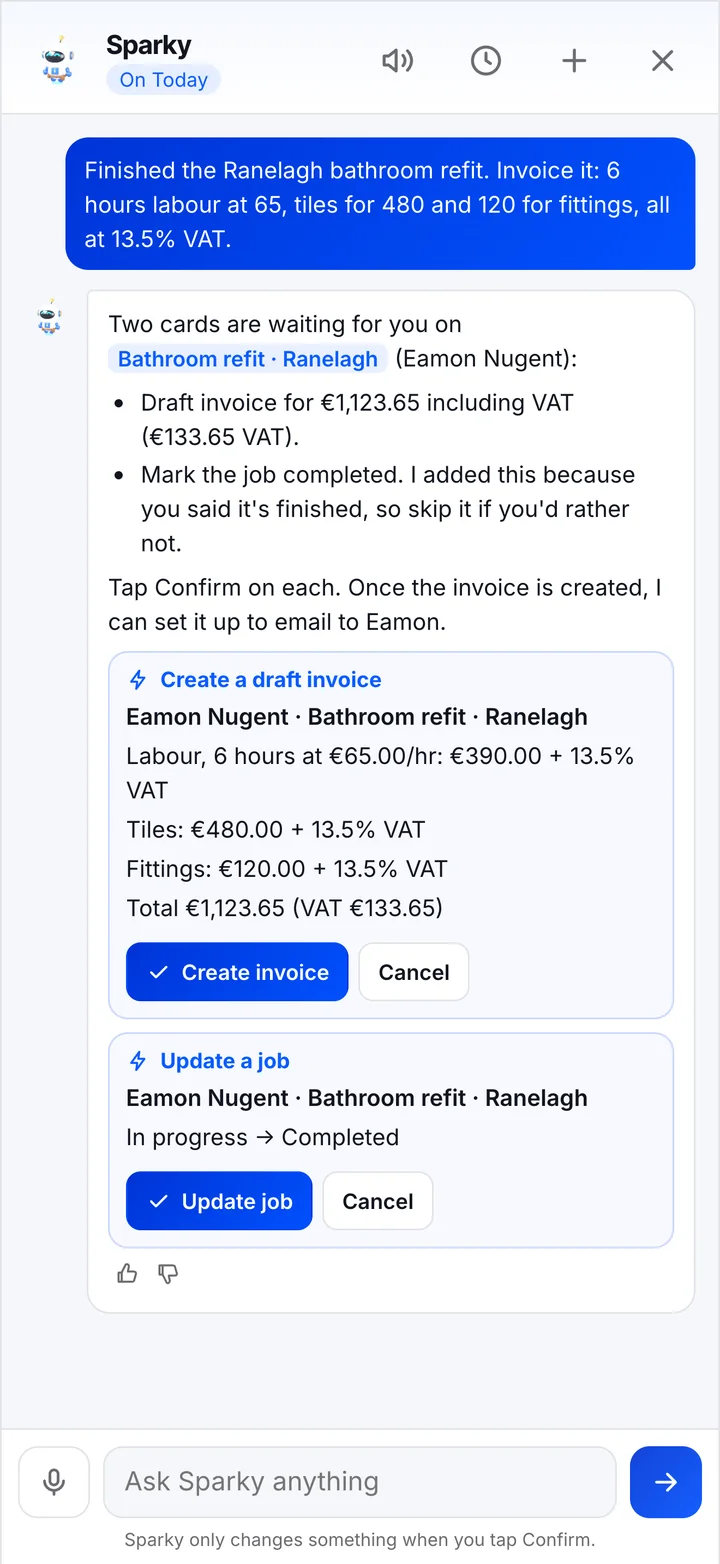
A real Sparky answer: the invoice and a job update, each waiting for a tap.
Say the labour, parts and prices. Sparky finds the customer and job, works out the VAT and shows the full quote or invoice before anything is created.
"And send it" brings up a Send card with the customer's email on it. The PDF and pay link go out from your board.
"Any emails?" checks email, WhatsApp, texts and Facebook and Instagram messages, and tells you who is still waiting on a reply.
Book a site visit, schedule a job with one of the lads, or ask what's on tomorrow.
"Remind me to ring Mary on Friday" or "add a note that they need a new thermostat".
"What am I forgetting?" finds enquiries nobody has answered, quotes waiting on a reply, overdue invoices and finished jobs not invoiced.
"Who owes me money?" and "how did we do this week?" come back with real numbers from your board, for the people who see money.
Changed your mind? Small changes can be undone for 15 minutes, straight from the card.
A short rundown every morning of today's bookings and anything that needs you, ready before you start.
Every change is shown as a card first. Sending to a customer or anything to do with money always needs a tap, even in hands-free mode.
Prices come from you or your saved price list. Sparky never guesses a rate, a price or the VAT.
Sparky only sees your own business, and each person only sees what the board would show them.
A customer's email can't tell Sparky what to do. It reads them for you, and that's all.
No. Sparky looks things up and gets changes ready, but nothing on your board changes until you tap Confirm on the card it shows you. Small things like a task or a note can be confirmed by saying yes. Anything that sends to a customer or involves money always needs a tap.
Never. Prices come from what you tell it or from your saved price list, and VAT from what you say. If something isn't on your list, Sparky asks you for the price.
Yes. It's tuned to your own board, so it knows your customers' names, your team and the items you sell. Siobhán Ní Mhaoláin comes out spelled right.
Yes. Turn on hands-free and Sparky reads its answer out loud, then listens for your next question. You only need to tap when it's sending something or creating a money document.
Sparky is for owners and office staff, so it only shows each person what the board would show them. People who don't see prices never see them in Sparky either.
Sparky is included on every FlashBooked board. Your monthly price depends on team size, workflows and integrations, and we agree it on the free demo before anything is set up.
Book a free demo. We'll set up a board like yours and you can try Sparky on it yourself.
Book a Free DemoFeatures: CRM for trades · Quote follow-up · Digital job sheets · Scheduling · Job costing · Sparky AI assistant